Bootstrap
CSS
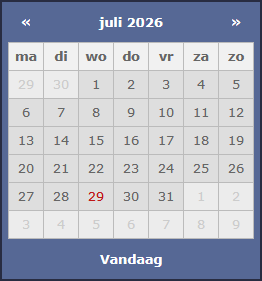
A custom VDWWD-style Bootstrap DatePicker Theme for version 1.9.0+ and Bootstrap 4 & 5.
Click or tap the date input field below for a demo.
Click or tap the date input field below for a demo.
<!DOCTYPE html>
<html lang="en">
<head>
    <meta charset="utf-8">
    <meta name="viewport" content="width=device-width, initial-scale=1">
    <link rel="shortcut icon" href="https://www.vanderwaal.eu/favicon.ico" />

    <title>VDWWD - Bootstrap 4 & 5 DatePicker theme</title>

    <link href="https://cdn.jsdelivr.net/npm/bootstrap@5.2.3/dist/css/bootstrap.min.css" rel="stylesheet" integrity="sha384-rbsA2VBKQhggwzxH7pPCaAqO46MgnOM80zW1RWuH61DGLwZJEdK2Kadq2F9CUG65" crossorigin="anonymous">

</head>
<body style="background-color: #4b4d66" class="pt-4">

    <!-- van der Waal Webdesign -->
    <!-- https://www.vanderwaal.eu -->

    <div class="container bg-white">

        <!-- demo content -->

        <div class="row">
            <div class="col-12 col-md-4 col-lg-3 mx-auto pt-4">

                <div class="input-group mb-3">
                    <span class="input-group-text p-0 ps-2 pe-2">
                        <label for="bootstrap-datepicker">
                            <svg xmlns="http://www.w3.org/2000/svg" width="24" height="24" viewBox="0 0 24 24" fill="none" stroke="currentColor" stroke-width="2" stroke-linecap="round" stroke-linejoin="round">
                                <rect x="3" y="4" width="18" height="18" rx="2" ry="2"></rect>
                                <line x1="16" y1="2" x2="16" y2="6"></line>
                                <line x1="8" y1="2" x2="8" y2="6"></line>
                                <line x1="3" y1="10" x2="21" y2="10"></line>
                            </svg>
                        </label>
                    </span>
                    <input type="text" class="form-control bootstrap-datepicker" id="bootstrap-datepicker" maxlength="10" autocomplete="off" placeholder="mm/dd/yyyy">
                </div>

            </div>
        </div>

        <!-- footer -->

        <div class="row footer-row">
            <div class="col text-center pt-5 pb-3">

                <a target="_blank" href="https://www.vanderwaal.eu">
                    <img src="https://www.vanderwaal.eu/images/vdwwd.png" alt="van der Waal Webdesign" title="van der Waal Webdesign" width="300" height="95" />
                </a>

            </div>
        </div>

    </div>

    <!-- scripts -->

    <script src="https://code.jquery.com/jquery-3.7.1.min.js" integrity="sha256-/JqT3SQfawRcv/BIHPThkBvs0OEvtFFmqPF/lYI/Cxo=" crossorigin="anonymous"></script>
    <script src="https://cdn.jsdelivr.net/npm/bootstrap@5.2.3/dist/js/bootstrap.bundle.min.js" integrity="sha384-kenU1KFdBIe4zVF0s0G1M5b4hcpxyD9F7jL+jjXkk+Q2h455rYXK/7HAuoJl+0I4" crossorigin="anonymous"></script>

    <!-- vdwwd scripts and stylesheets -->

    <script src="https://cdnjs.cloudflare.com/ajax/libs/bootstrap-datepicker/1.10.0/js/bootstrap-datepicker.min.js"></script>
    <script src="bootstrap-4-and-5-datepicker-theme.js"></script>
    <link href="bootstrap-4-and-5-datepicker-theme.css" rel="stylesheet">

</body>
</html>
.datepicker {
    font-family: Verdana, Arial;
    background-color: #566895;
    border: 2px solid #282c41;
    direction: ltr;
    padding: 6px;
    color: #fff;
    font-size: .8rem;
    min-width: 250px;
    border-radius: 0;
    box-shadow: 4px 4px 4px rgba(0, 0, 0, 0.4);
}

    .datepicker table {
        width: 100%
    }

    .datepicker tbody td,
    .datepicker thead .dow {
        border: 1px solid #bbb
    }

    .datepicker td,
    .datepicker th {
        width: 35px;
        height: 28px;
        text-align: center
    }

    .datepicker table tr th.dow {
        color: #666;
        background-color: #f1f1f1
    }

    .datepicker table tr td.day {
        color: #666;
        background-color: #dedede
    }

        .datepicker table tr td.day:hover,
        .datepicker table tr td.day.focused {
            background: #566895;
            cursor: pointer
        }

    .datepicker table tr td.old,
    .datepicker table tr td.old:hover,
    .datepicker table tr td.new,
    .datepicker table tr td.new:hover {
        color: #ccc;
        background: #ececec;
        cursor: default
    }

    .datepicker table tr td.day:not(.old):not(.new):hover,
    .datepicker table tr td.today:hover,
    .datepicker table tr td.today:hover:hover,
    .datepicker table tr td.today.disabled:hover,
    .datepicker table tr td.today.disabled:hover:hover,
    .datepicker table tr td.today:active,
    .datepicker table tr td.today:hover:active,
    .datepicker table tr td.today.disabled:active,
    .datepicker table tr td.today.disabled:hover:active,
    .datepicker table tr td.today.active,
    .datepicker table tr td.today:hover.active,
    .datepicker table tr td.today.disabled.active,
    .datepicker table tr td.today.disabled:hover.active,
    .datepicker table tr td.today.disabled,
    .datepicker table tr td.today:hover.disabled,
    .datepicker table tr td.today.disabled.disabled,
    .datepicker table tr td.today.disabled:hover.disabled,
    .datepicker table tr td.today[disabled],
    .datepicker table tr td.today:hover[disabled],
    .datepicker table tr td.today.disabled[disabled],
    .datepicker table tr td.today.disabled:hover[disabled] {
        background-color: #566895;
        color: #fff
    }

        .datepicker table tr td.active,
        .datepicker table tr td.active:hover,
        .datepicker table tr td.active.disabled,
        .datepicker table tr td.active.disabled:hover,
        .datepicker table tr td.today,
        .datepicker table tr td.today:hover,
        .datepicker table tr td.today.disabled,
        .datepicker table tr td.today.disabled:hover {
            background-color: #dedede;
            border-color: #bbb
        }

            .datepicker table tr td.active,
            .datepicker table tr td.active:hover,
            .datepicker table tr td.active.disabled,
            .datepicker table tr td.active.disabled:hover,
            .datepicker table tr td.today:hover,
            .datepicker table tr td.today.disabled:hover {
                background-color: #8493bc !important;
                color: #fff
            }

            .datepicker table tr td.today,
            .datepicker table tr td.today.disabled {
                color: #bf1616;
                background-color: #dedede
            }

    .datepicker .datepicker-switch:hover,
    .datepicker .prev:hover,
    .datepicker .next:hover,
    .datepicker tfoot tr th:hover {
        background: #8493bc;
        cursor: pointer
    }

    .datepicker .next:hover,
    .datepicker tfoot tr th:hover {
        border-right: 1px solid #8493bc
    }

    /* needed to generate space between the second and third thead row in day view */
    .datepicker .extraHeaderSpacer {
        padding: 0px !important;
        height: 6px !important;
        min-height: 1px !important;
    }

    /* needed to generate space between the today button and all the days in day view */
    .datepicker tfoot::before {
        content: '';
        display: block;
        height: 6px;
    }

    /* months, years, decades and centuries */
    .datepicker span {
        color: #666;
        background-color: #dedede;
        border-top: 1px solid #bbb;
        border-right: 1px solid #bbb;
        width: 25%;
        height: 50px;
        line-height: 50px;
        display: block;
        float: left
    }

        .datepicker span:hover {
            background-color: #566895 !important;
            color: #fff !important
        }

        .datepicker span.active {
            background-color: #8493bc;
            color: #fff;
            border-top: 1px solid #bbb;
            border-right: 1px solid #bbb
        }

        .datepicker span.focused:not(.active) {
            color: #666;
            background-color: #dedede
        }

    .datepicker .datepicker-decades tbody td,
    .datepicker .datepicker-centuries tbody td,
    .datepicker .datepicker-years tbody td,
    .datepicker .datepicker-months tbody td {
        padding: 0;
        border-bottom: 1px solid #bbb;
        border-left: 1px solid #bbb;
        border-top: 0;
        border-right: 0
    }
$(document).ready(function () {

    //bind the datepicker to the correct textbox class
    $('.bootstrap-datepicker').datepicker({
        autoclose: true,
        todayHighlight: true,
        todayBtn: 'linked',
        language: 'en-US',
        orientation: 'bottom',
        templates: {
            leftArrow: '«',
            rightArrow: '»'
        }
    }).on('show', function () {

        //needed to generate space between the day of week row and the prev/next/month name row.
        //there are 3 rows in the tdhead without class names so this is my way to add some spacing between the two.
        if ($('.extraHeaderSpacer').length === 0) {
            $('<tr><td colspan="7" class="extraHeaderSpacer"></td></tr>').insertBefore($('.datepicker-days thead tr:last-of-type'));
        }
    });
});